gather-bots

Put your work
on the desk.

The reviews waiting on you, the pipeline that just went red, the meeting starting in five minutes — shown on the objects sitting on your desk in Gather, where the room can read them without anyone opening a tab or asking.
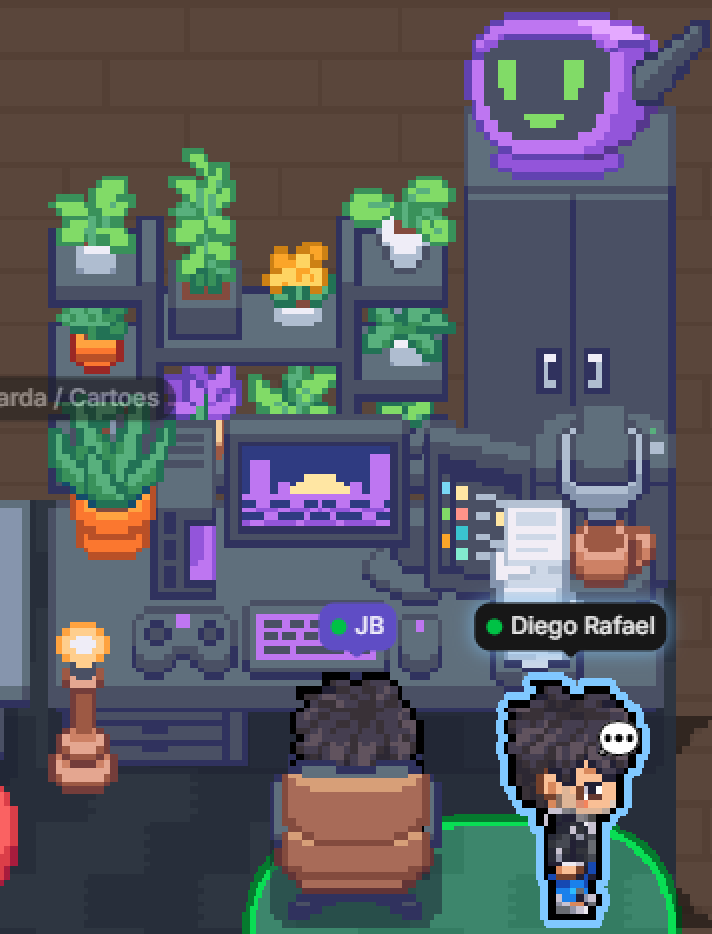

A desk in a Gather office: shelves of plants, a monitor and keyboard, a lit lamp, a tray of papers, and a status monitor showing a smiling face.
Inbox
6 waiting — three reviews, three tasks

Status monitor
smiling — every pipeline green

Lamp
lit — free to interrupt
A real desk, mid-afternoon. The monitor smiles because nothing is broken.

The objects are Gather's

Smart Objects are a Gather feature, shipped in July 2026: you place one from Decorate Desk, it gives you a webhook URL and a key, and it renders whatever you send it. That part is theirs — their guide explains placing one, and their reference documents what each object accepts.

You do not need this project to use them. Anything that can make an HTTP request will do, and Gather publishes an SDK that handles the signing for you.

What lives here is the part after that: deciding what is worth showing, keeping it honest when a source goes quiet, and not spending your space's rate limit repeating yourself.

Three objects, three questions

Each one answers a single thing, so a glance is enough. What feeds it is up to you.

What is waiting on me

A count readable across the room, and a feed of links you can click when you get there.

  • count everything still on you
  • feed oldest first, fifteen at most
  • +N when the queue runs longer than that

What is running without me

One face for the state of everything you don't have to touch. It smiles, questions, or warns.

  • smiling green and idle
  • warning production broken
  • question develop broken, or a meeting close
  • timer a build running, or you in a meeting

Can I be interrupted

Lit or dark, so it reads from anywhere in the room. You choose which fact it carries.

  • lit free to interrupt
  • dark in a meeting, or one starts within five minutes
  • swap lit when production is down instead

Where the signals come from

Connect one and it works. Everything you leave alone stays quietly off.

Azure DevOps · pull requests

Reviews assigned to you and still unvoted, plus your own pull requests sitting open longer than two days.

Azure DevOps · work items

Only the states you name as yours — and optionally only your team's current sprint.

Azure DevOps · pipelines

The latest run per pipeline and branch, so a failure that has since been fixed stops counting. Main and develop are told apart, and you can exclude the one that is always red.

Google Calendar

Meetings in progress or about to start, and invitations you haven't answered. All-day entries are ignored.

Outlook · Microsoft 365

The same, from a Microsoft tenant. Both calendars can run at once.

Uptime monitor

Your monitor posts here when something goes down. Grafana and UptimeRobot have their own routes; anything else can use the plain one.

Setting it up

Place an object in Gather, copy its webhook URL and key into .env, then ask what's missing. You don't have to fill everything in — one object and one source is a working setup.

git clone git@github.com:Jbnado/gather-bots.git
pnpm install
cp .env.example .env
pnpm checkup

Node 24 and pnpm. There is a compose file if you would rather not.

pnpm checkup tells you where you stand at any point. It separates "you haven't set this up" from "you set it up and it's broken", because only the second one needs you.

Smart objects
   Inbox                inbox · inbox
   Bot Status Monitor   status · activity-monitor
   Lightbulb            not configured

Integrations
   Azure DevOps · pull requests   ready
   Google Calendar   off — missing GOOGLE_CLIENT_ID
                    → docs/integrations/google-calendar.md

Making it yours

The middle of the program knows nothing about Azure DevOps, Google, Microsoft — or about Gather. Three separate things can be added without touching it.

A source

Jira, GitHub, Linear, an internal API. Return a list of signals, add one line to a list.

A reading

A different way of putting those signals on an object. A pure function, tested in a few lines.

Somewhere else entirely

Drive a Hue bulb, a Slack status, an LED strip. Nothing above it has to change.

Read the code →